「12B 支援 8K context」在 Ollama Library 頁面上看起來像是承諾,但真實意思可能只是「模型不會崩」,不是「你把事實藏在文件正中間它找得到」。官方說法 vs 中段的實際失憶率——一張熱力圖說完。我把一句明確的事實藏進 1K、2.5K、4.5K 長度的繁中文章各五個位置,量 gemma4:12b 真實的「找得到率」。這是12B 五項綜合實測之後,針對長 context 的單項深挖。
"12B supports an 8K context" reads like a promise on the Ollama Library page, but practically it might just mean "the model won't crash" — not "hide a fact dead-center and it'll find it." The official claim vs measured mid-context recall — one heatmap tells the whole story. I planted one explicit fact in 1K, 2.5K, and 4.5K-character Chinese documents at five positions each, and measured gemma4:12b's actual recall rate. This is the long-context deep-dive that follows the 12B five-test benchmark.
設定
| 項目 | 規格 |
|---|---|
| 機器 | MacBook Pro 14" M1 Pro, 16GB |
| Ollama | 0.30.6 |
| 模型 | gemma4:12b (Q4_K_M, 7.6 GB) |
| num_ctx | 8192 |
| temperature | 0.0(要可重現) |
| 文件長度 | 1K / 2.5K / 4.5K 中文字(≈ tokens) |
| Needle 位置 | 0% / 25% / 50% / 75% / 100% |
| 每組合 | 2 個不同 needle(換掉具體溫度與城市以避免 cache shortcut) |
| 總執行 | 3 × 5 × 2 = 30 次推論 |
量化取 Q4_K_M 而不是 Q5/Q6 的理由,見Gemma 4 12B 量化選擇實測;還沒裝 Ollama 的話,先從三指令快速上手開始。
Needle 模板(隨機抽兩種):
重要提示:在 {date},{city} 的氣溫達到攝氏 {temp} 度,破了該年度的單日高溫紀錄。
Filler:10 段我手工撰寫的繁中日常段落(買菜、修家電、爬山、整理筆記……),刻意避開任何科技、氣象、法律語彙——這樣 needle 在主題上會明顯凸出,模型不能用主題對比偷雞。
Query:
請根據上面這段文字回答:{date} 那天 {city} 的氣溫是攝氏多少度?只回答數字(含單位),不要解釋。
Pass 判定:response 用 regex 抓所有數字,看 needle 的精確溫度(例如 37.2)是否出現在數字清單裡。是 → PASS。
完整資料生成器 tests/scripts/build_haystack.py、執行器 tests/scripts/run_needle.py、結果 tests/outputs/needle_results.jsonl。
Setup
| Item | Spec |
|---|---|
| Machine | MacBook Pro 14" M1 Pro, 16GB |
| Ollama | 0.30.6 |
| Model | gemma4:12b (Q4_K_M, 7.6 GB) |
| num_ctx | 8192 |
| temperature | 0.0 (for reproducibility) |
| Doc lengths | 1K / 2.5K / 4.5K Chinese chars (≈ tokens) |
| Needle positions | 0% / 25% / 50% / 75% / 100% |
| Per combination | 2 different needles (swap temp + city to defeat caching) |
| Total runs | 3 × 5 × 2 = 30 inferences |
Why Q4_K_M and not Q5/Q6 is covered in the gemma4:12b quantization picker; if you haven't installed Ollama yet, start with the three-command quickstart.
Needle template (2 variants):
Important: on {date}, {city} reached {temp}°C, setting an annual high.
Filler: 10 hand-written mundane Chinese paragraphs (grocery shopping, appliance repair, hiking, note-taking…) — deliberately avoiding any tech, weather, or legal vocabulary so the needle stands out topically and the model can't cheat via topic contrast.
Query:
From the text above, what was {city}'s temperature on {date}? Just give the number with units. No explanation.
Pass criterion: regex-extract every number from the response and check if the needle's exact temperature (e.g. 37.2) appears. Yes → PASS.
Data generator: tests/scripts/build_haystack.py. Runner: tests/scripts/run_needle.py. Results: tests/outputs/needle_results.jsonl.
藏在中段的事實,12B 真的找得到嗎?
15 個位置組合,每組合 2 次:
| Context | 0% | 25% | 50% | 75% | 100% | 合計 |
|---|---|---|---|---|---|---|
| 1K | 2/2 | 2/2 | 2/2 | 2/2 | 2/2 | 10/10 |
| 2.5K | 2/2 | 2/2 | 2/2 | 2/2 | 2/2 | 10/10 |
| 4.5K | 2/2 | 2/2 | 2/2 | 2/2 | 2/2 | 10/10 |
| 總計 | 30/30 |
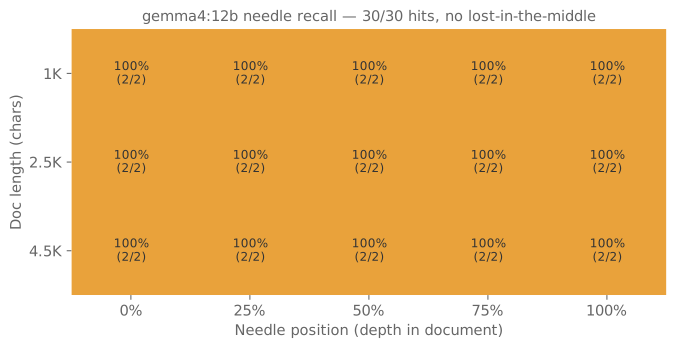
老實說我沒料到全綠。文獻上 "lost in the middle"(Liu et al., 2023)是 LLM 處理長 context 的經典痛點——資訊塞在 25-75% 位置時準確率明顯下滑。在我這個範圍與這個任務型態,12B + 8K context 完全沒踩到這個雷。
要解釋這個結果有幾個方向:
- Needle 太顯眼。我刻意把 needle 包成「重要提示:在 {date}…」的固定句式,模型在大量繁中日常段落(買菜、修家電、爬山)裡撈到這個句型就 lock 上了。如果 needle 改寫成日常語氣,結果應該會慘很多——這是後續可以追的實驗。
- 任務是「精準擷取數字」。比起「整合多段資訊」「跨段落推理」這類任務,這題對模型的要求最低。
- 4.5K 還在 8K context window 的 56% 利用率。沒有逼到上限。要看真實衰減點,得用 6-7K 文件再測一次。
但「lost in the middle 在這範圍實質不存在」這個結論對本機 RAG 還是有實用價值:當你把 retrieval 的 Top-K 段落塞給 12B 摘要或回答,至少在 4.5K 以內不必煩惱「答案藏在中段」的問題。
Does 12B actually find a fact buried mid-document?
15 position cells × 2 reps each:
| Context | 0% | 25% | 50% | 75% | 100% | Total |
|---|---|---|---|---|---|---|
| 1K | 2/2 | 2/2 | 2/2 | 2/2 | 2/2 | 10/10 |
| 2.5K | 2/2 | 2/2 | 2/2 | 2/2 | 2/2 | 10/10 |
| 4.5K | 2/2 | 2/2 | 2/2 | 2/2 | 2/2 | 10/10 |
| Total | 30/30 |
Honestly didn't expect a perfect sweep. The literature's "lost in the middle" effect (Liu et al., 2023) is the classic long-context pain point — accuracy dips when info sits at 25–75%. In this range and task shape, 12B + 8K context didn't hit it.
A few reads on the result:
- The needle was too distinctive. I formatted it as a fixed phrase ("Important: on {date}…") embedded in mundane Chinese paragraphs (groceries, repairs, hiking). Once the model spots that phrase template inside thousands of characters of small-talk, it locks on. Rewriting the needle to sound like normal prose would probably look much worse — a follow-up worth running.
- The task is literal extraction. Compared with "synthesize across paragraphs" or "reason about multiple facts," number extraction is the easiest mode.
- 4.5K is still 56% of the 8K window. Not pushed to the ceiling. To find a real degradation point, I'd retest at 6–7K.
That said, "no lost-in-the-middle in this range" is a useful conclusion for local RAG: when you feed the retrieval Top-K to 12B for summarization or QA, at least within 4.5K you don't need to worry about answers being buried in the middle.
零失敗之下,還有什麼副作用?
沒有失敗可以分析。 30 個測試全部正確抽到 needle 的溫度數字。
不過附帶觀察到一個副作用:模型不守「只回數字」指示。 prompt 寫得很明確:
請根據上面這段文字回答:{date} 那天 {city} 的氣溫是攝氏多少度?只回答數字(含單位,例如『37.2 度』),不要解釋。
實際輸出平均 250-280 token——這比目標格式(「37.2 度」= 4 token)多了 60-70 倍。內容大致是:先回答「37.2 度」,然後附加「原文提到……」「這代表破了該年度的單日高溫紀錄」一類的延伸說明。
從 Ollama streaming 那篇 的延伸結論看,這對使用者體感的影響是:即使你以為要的是短回應,本機模型給的是中段回應——所以該用 stream 的時機比直覺更早。
Zero failures — so what's the catch?
There are no failures to analyze. All 30 trials retrieved the correct temperature.
A side observation though: the model ignores "just give the number" instructions. The prompt was explicit:
From the text above, what was {city}'s temperature on {date}? Just give the number with units (e.g. "37.2 度"). No explanation.
Actual responses average 250-280 tokens — 60-70× the target format ("37.2 度" = 4 tokens). The content usually answers correctly first ("37.2 度") then appends explanations like "the text mentions…" and "this broke the annual single-day high record."
Tying back to the streaming article, this reinforces the conclusion: even when you expect a short response, local models deliver medium-length output — so the threshold for using streaming is lower than intuition suggests.
context 拉長 5 倍,會慢幾倍?
實際量到的時間隨 context 變化(中位數):
| Context | Prompt tokens | 平均 wall time | 輸出 token 數 |
|---|---|---|---|
| 1K | 874 | 28.3 s | 281 |
| 2.5K | 1998 | 35.5 s | 248 |
| 4.5K | 3489 | 49.3 s | 256 |
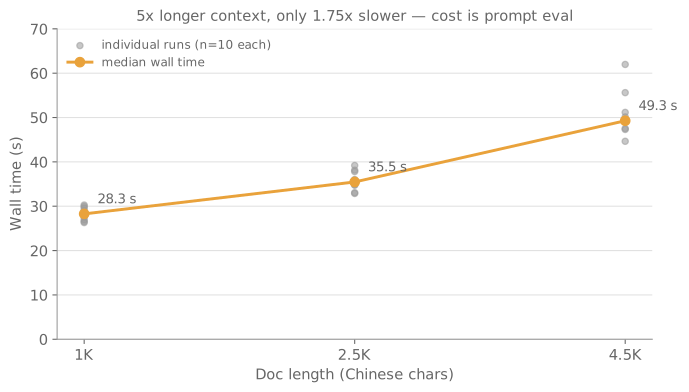
讀法:context 從 1K 拉到 4.5K(5 倍)只讓 wall time 從 28 秒長到 49 秒(1.75 倍)。增加的時間幾乎都是 prompt evaluation——M1 Pro 在「吃進長 context」這件事上比想像中快。輸出 token 數三個 context 都差不多(~250),所以生成階段時間幾乎一樣。
記憶體:num_ctx=8192 載入 gemma4:12b 後,搭配同時開的 Safari + Obsidian,M1 Pro 16GB 的記憶體壓力圖在跑測期間維持綠色——沒進入 swap 階段。這個 setup 是可以日常用的。但要再開 e2b 或第三個 app 就會吃緊。
5× longer context — how much slower?
Measured wall time vs context length (median):
| Context | Prompt tokens | Avg wall time | Output tokens |
|---|---|---|---|
| 1K | 874 | 28.3 s | 281 |
| 2.5K | 1998 | 35.5 s | 248 |
| 4.5K | 3489 | 49.3 s | 256 |
How to read it: stretching context from 1K to 4.5K (5×) only pushes wall time from 28s to 49s (1.75×). The added time is almost all prompt evaluation — M1 Pro chews through long Chinese context faster than I'd guessed. Output token count is similar across all three (~250), so generation time barely moves.
Memory: with num_ctx=8192, gemma4:12b loaded alongside Safari and Obsidian running. Memory-pressure graph stayed green throughout — no swap. The setup is fine for daily use. Adding e2b or a third heavy app would tip it into yellow.
這個方法哪裡不嚴謹?
全綠的結果反而更需要自我檢查。這個實驗至少有五個地方不夠嚴謹:
- 每格只有 2 次:15 個組合各跑 2 個 needle,n=2 沒有任何統計檢定力——「100%」跟「碰巧兩次都中」無法區分。要給出像樣的信賴區間,每格至少要 20 次以上。
- Needle 太顯眼:固定的「重要提示:……」句式在買菜、修家電這類日常段落裡主題突出,模型可能是靠句型對比 lock 上,不是真的「記得」中段內容。
- 只測精準擷取:抓一個溫度數字是長 context 任務裡最簡單的形態,這個結果不能外推到跨段落整合或多步推理。
- 沒逼近 8K 上限:最長 4.5K 輸入只用了 context window 的一半多,真正的衰減點可能藏在 6-7K,這次沒碰到。
- 單一模型、單一量化、單次執行:只測了 gemma4:12b Q4_K_M、temperature 0.0 一輪,換量化等級、換模型、換溫度都可能改變結論。
統計嚴謹性——信賴區間怎麼算、樣本數要多大才夠——是接下來 eval-engineering 系列要專門處理的主題,見系列頁。
Where does this method fall short?
An all-green result deserves more scrutiny, not less. At least five weaknesses:
- Only 2 reps per cell: 15 cells × 2 needles each — n=2 has zero statistical power, so "100%" and "got lucky twice" are indistinguishable. A meaningful confidence interval would need 20+ runs per cell.
- The needle is too distinctive: the fixed "Important: …" phrasing pops out of grocery-and-appliance filler; the model may lock onto the template contrast rather than genuinely recalling mid-context content.
- Literal extraction only: pulling one temperature number is the easiest long-context task shape; this result doesn't extrapolate to cross-paragraph synthesis or multi-step reasoning.
- Never pushed near the 8K ceiling: the longest input (4.5K) uses just over half the window — the real decay point may hide at 6-7K, untouched here.
- One model, one quant, one pass: only gemma4:12b Q4_K_M at temperature 0.0, single round. A different quant, model, or temperature could change the conclusion.
Statistical rigor — how to compute confidence intervals, how large N needs to be — is exactly what the upcoming eval-engineering series covers: see the series hub.
什麼情境下可以信任 12B 的 8K context?
波形評級:CLEAN_SIGNAL
12B + 8K context 在這個任務範圍(≤ 4.5K 輸入)可以信任:
- ✅ 0% / 25% / 50% / 75% / 100% 五個位置命中率都 100%
- ✅ 速度可接受:4.5K 輸入下 wall time ~50 秒,主要是 prompt eval
- ✅ M1 Pro 16GB 可以同時開 Safari + Obsidian,沒進 swap
- ⚠️ 「只回數字」的格式約束模型完全不理——下游程式要自己截斷
- ⚠️ 沒測 6-7K 接近 8K 上限的衰減——未來再追
對本機 RAG 設計的意涵:
- Top-K 召回後的段落塞給 12B 摘要,4.5K 以內不必擔心「答案藏中段」
- 不需要做「把重要段落放第一或最後」這種討好 lost-in-the-middle 的工程
- 如果你的 RAG 內容超過 4.5K,要嘛分段、要嘛再做這個 audit 看 6-7K 衰減點
擂台系列導覽:這篇是「本地模型擂台」系列的其中一戰——12B 五項綜合實測、量化等級怎麼挑,以及更多本地模型捉對實測,都整理在系列總覽頁。
When can you trust 12B's 8K context?
Waveform: CLEAN_SIGNAL
12B + 8K context is trustworthy in this task range (≤ 4.5K input):
- ✅ Hit rate is 100% at every tested position (0/25/50/75/100%)
- ✅ Speed is acceptable: 4.5K input → ~50s wall time, dominated by prompt eval
- ✅ M1 Pro 16GB holds Safari + Obsidian + 12B without swapping
- ⚠️ Model completely ignores the "just give the number" format constraint — downstream code must truncate
- ⚠️ Didn't probe 6-7K (near the 8K ceiling) — future work
Implications for local RAG design:
- After Top-K retrieval, feeding the passages to 12B for summarization or QA is fine as long as you stay under 4.5K — no need to worry about middle-of-context burial
- No need for "put the important passage first or last" gymnastics that target lost-in-the-middle
- If your RAG context exceeds 4.5K: chunk, or rerun this audit at 6-7K to find your decay point
More from the Local Model Arena: this article is one bout in the series — the 12B five-test benchmark, quantization picks, and more head-to-head local-model matchups are collected on the series hub.