打開 Claude Desktop、Claude Code、Cursor,會看到一堆 MCP server 可以裝。但作為使用者,最常見的疑問是——這跟我直接寫 Python 串 API 有什麼不同?
這篇文章用最小可行的方式回答這個問題:用 Python MCP SDK 連 filesystem MCP server,跑一個 5 筆交易的工作流(寫檔、分類、月報),全程本機、無雲端依賴。
Open Claude Desktop, Claude Code, or Cursor, and you see a flood of MCP servers you can install. As a user the most common question is — how is this different from just writing a Python script that calls some APIs?
This article answers that with the smallest possible example: Python MCP SDK connecting to a filesystem MCP server, running a 5-transaction workflow (write files, classify, generate monthly report) entirely on the local machine, no cloud.
MCP 三角關係
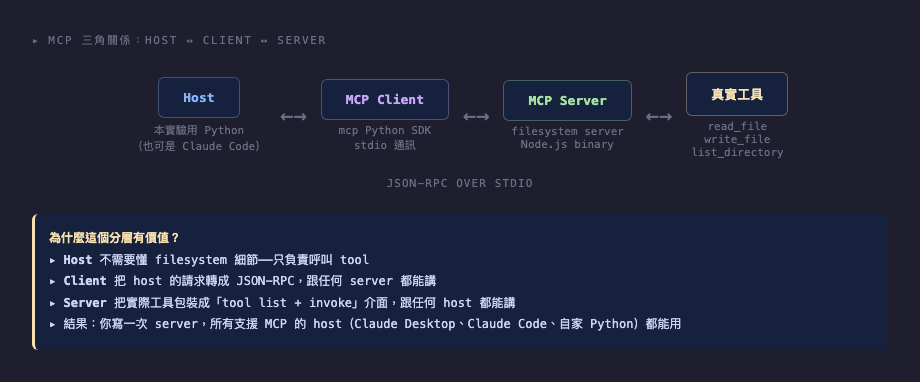
MCP 把 LLM 與工具的溝通拆成三層:
- Host:執行 LLM 對話的程式(Claude Desktop、Claude Code、本實驗的 Python)
- MCP Client:把 host 的請求翻譯成 JSON-RPC,傳給 server
- MCP Server:把實際工具(filesystem、database、API)包裝成「tool list + invoke」介面
通訊協定:JSON-RPC over stdio(最小相依,跨語言)。
這個分層的價值不在「能用」,而在「寫一次 server,所有支援 MCP 的 host 都能用」。我寫一個 sqlite MCP server,Claude Desktop 能用、Claude Code 能用、我的 Python 腳本也能用——不需重寫。
The MCP Triangle
MCP splits LLM-to-tool communication into three layers:
- Host: the program running the LLM conversation (Claude Desktop, Claude Code, or in this experiment, Python)
- MCP Client: translates the host's requests into JSON-RPC and sends to the server
- MCP Server: wraps real tools (filesystem, database, API) into a "tool list + invoke" interface
Protocol: JSON-RPC over stdio (minimal dependencies, language-agnostic).
The value of this layering isn't "it works" — it's that "write the server once, every MCP-aware host can use it." Write a sqlite MCP server once: Claude Desktop uses it, Claude Code uses it, your Python script uses it. No rewrites.
Demo 1:連 filesystem server,列出 tools
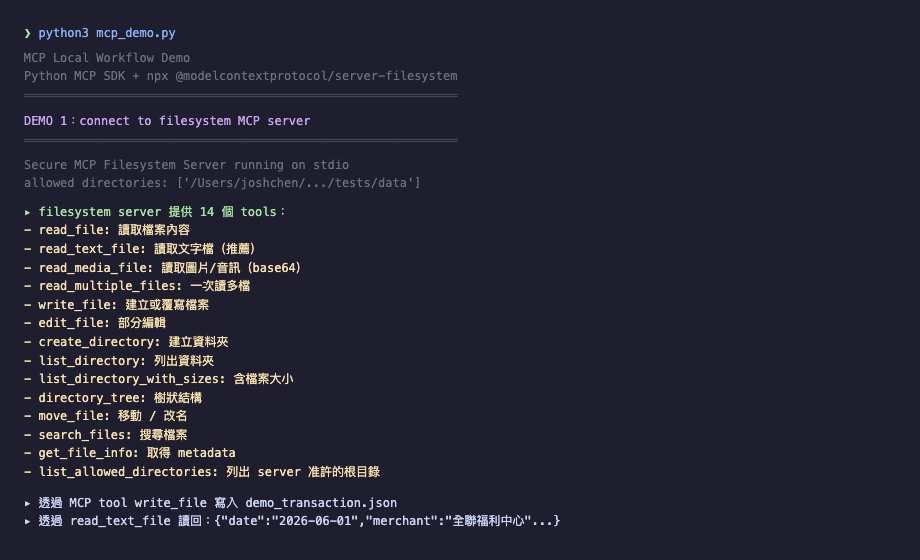
Python 端:
from mcp import ClientSession, StdioServerParameters
from mcp.client.stdio import stdio_client

params = StdioServerParameters(
    command="/tmp/mcp-install/node_modules/.bin/mcp-server-filesystem",
    args=[str(DATA_DIR)],
)

async with stdio_client(params) as (read, write):
    async with ClientSession(read, write) as session:
        await session.initialize()
        tools = await session.list_tools()
        # → 14 個 tools: read_file, write_file, list_directory, ...
@modelcontextprotocol/server-filesystem 是官方 Node binary,提供 14 個 file operation tools。透過 stdio_client spawn 一個 child process,雙向 JSON-RPC 通訊。
實際呼叫:
await session.call_tool("write_file", {
    "path": "/path/to/output.json",
    "content": json.dumps(data)
})
跟直接 Path(...).write_text() 比起來,多了「JSON-RPC 序列化 + 跨 process 傳遞」的開銷(約 200ms),但換來「標準化」與「LLM 可組合性」。
Demo 1: Connect to filesystem Server, List Tools
Python side:
from mcp import ClientSession, StdioServerParameters
from mcp.client.stdio import stdio_client

params = StdioServerParameters(
    command="/tmp/mcp-install/node_modules/.bin/mcp-server-filesystem",
    args=[str(DATA_DIR)],
)

async with stdio_client(params) as (read, write):
    async with ClientSession(read, write) as session:
        await session.initialize()
        tools = await session.list_tools()
        # → 14 tools: read_file, write_file, list_directory, ...
@modelcontextprotocol/server-filesystem is the official Node binary, providing 14 file operation tools. stdio_client spawns a child process for bidirectional JSON-RPC communication.
Actual tool call:
await session.call_tool("write_file", {
    "path": "/path/to/output.json",
    "content": json.dumps(data)
})
Compared to direct Path(...).write_text(), MCP adds ~200ms of "JSON-RPC serialization + cross-process communication" overhead. The trade is "standardization" and "LLM composability."
Demo 2:讓 LLM 自己挑 tool
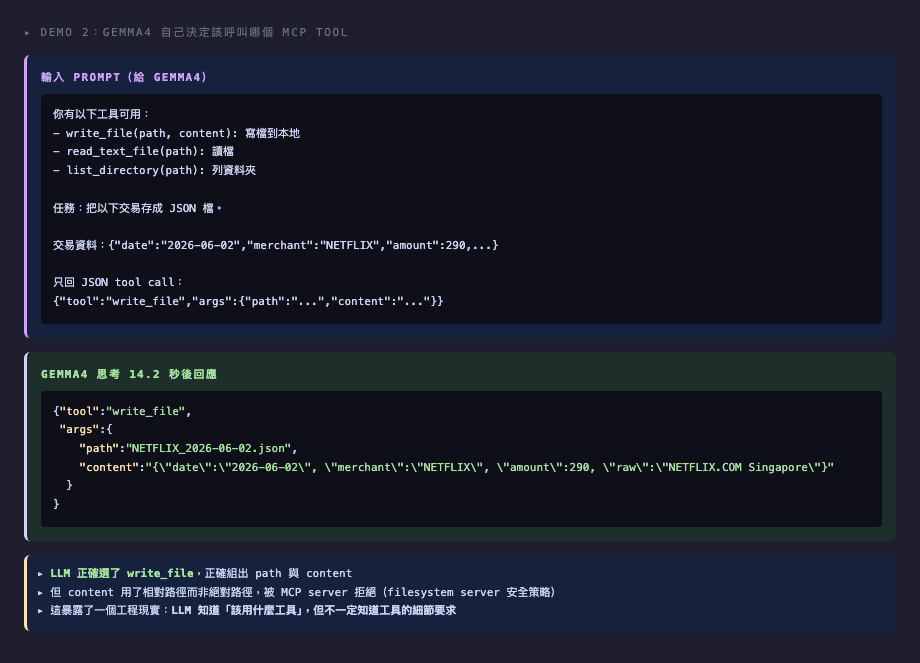
把工具列表與一筆交易給 gemma4,要它選工具:
你有以下工具:
- write_file(path, content)
- read_text_file(path)
- list_directory(path)

任務:把交易存成 JSON 檔
交易:{"date":"2026-06-02","merchant":"NETFLIX","amount":290}

只回 tool call JSON
gemma4 思考 14 秒後回應:
{
  "tool": "write_file",
  "args": {
    "path": "NETFLIX_2026-06-02.json",
    "content": "{\"date\":\"2026-06-02\",\"merchant\":\"NETFLIX\",\"amount\":290}"
  }
}
但執行失敗:path 用了相對路徑 NETFLIX_2026-06-02.json,MCP server 拒絕(因為 server 不在那個 cwd)。
這暴露了一個工程現實:LLM 知道「該用什麼工具」,但不一定知道「工具的細節要求」。host 層需要做:
- 在 system prompt 明確說明 path 必須是絕對路徑
- 或在 tool call 後攔截,自動補完 path prefix
這也是 MCP 真實使用要 handle 的部分——介面標準化不等於「LLM 自動會用」。
Demo 2: Let the LLM Pick the Tool
Give gemma4 the tool list and one transaction, ask it to choose:
You have these tools:
- write_file(path, content)
- read_text_file(path)
- list_directory(path)

Task: save this transaction as JSON
Transaction: {"date":"2026-06-02","merchant":"NETFLIX","amount":290}

Reply only with tool call JSON
After 14 seconds gemma4 responds:
{
  "tool": "write_file",
  "args": {
    "path": "NETFLIX_2026-06-02.json",
    "content": "{\"date\":\"2026-06-02\",\"merchant\":\"NETFLIX\",\"amount\":290}"
  }
}
But execution fails: path uses a relative NETFLIX_2026-06-02.json, and the MCP server rejects it (since the server isn't running in that cwd).
This exposes an engineering reality: the LLM knows which tool to use, but not necessarily the tool's detail requirements. The host layer needs to:
- Explicitly state in the system prompt that paths must be absolute
- Or intercept tool calls and auto-prepend the path prefix
This is part of what real MCP integration handles — interface standardization isn't the same as "LLM automatically knows how to use it."
Demo 3:完整工作流
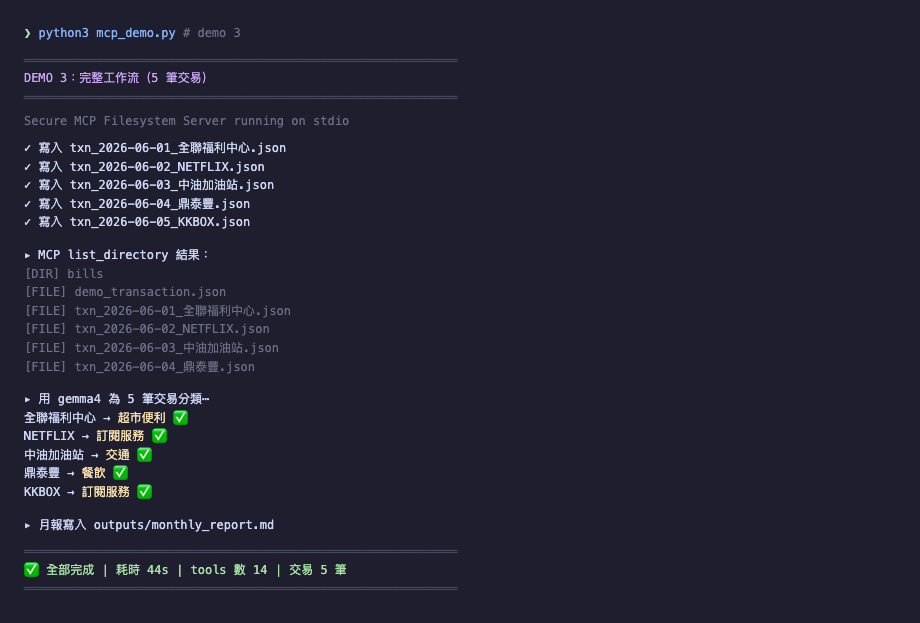
5 筆假交易(全聯、NETFLIX、中油、鼎泰豐、KKBOX),跑完整流程:
- 透過 MCP:write_file 5 次(每筆交易存 JSON)
- 透過 MCP:list_directory 確認檔案都在
- gemma4 分類:每筆交易給類別(餐飲 / 訂閱 / 超市 / 交通)
- Python 彙整:產出月報 markdown
gemma4 分類結果:
| 商家 | 類別 |
|---|---|
| 全聯福利中心 | 超市便利 ✅ |
| NETFLIX | 訂閱服務 ✅ |
| 中油加油站 | 交通 ✅ |
| 鼎泰豐 | 餐飲 ✅ |
| KKBOX | 訂閱服務 ✅ |
5/5 完全正確。這得益於 prompt 設計拿掉「不確定回其他」這個退路(同 static-vs-dynamic 那篇的學習)。
Demo 3: The Full Workflow
5 fake transactions (全聯, NETFLIX, 中油, 鼎泰豐, KKBOX), running the full flow:
- Via MCP: write_file 5 times (one JSON per transaction)
- Via MCP: list_directory to confirm
- gemma4 classifies: each transaction gets a category (dining / subscription / grocery / transport)
- Python aggregates: produces a monthly markdown report
gemma4's classifications:
| Merchant | Category |
|---|---|
| 全聯福利中心 | 超市便利 ✅ |
| NETFLIX | 訂閱服務 ✅ |
| 中油加油站 | 交通 ✅ |
| 鼎泰豐 | 餐飲 ✅ |
| KKBOX | 訂閱服務 ✅ |
5/5 correct. This benefits from dropping the "if unsure, answer other" escape hatch in the prompt (same lesson as the static-vs-dynamic article).
產出的月報
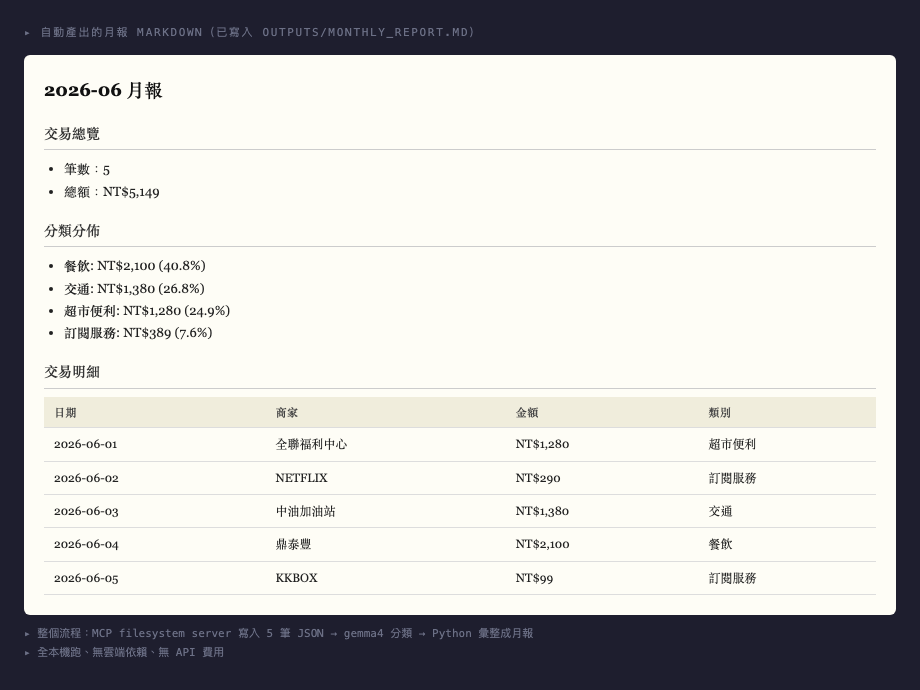
Python 把 5 筆分類結果彙整成 markdown 月報:
# 2026-06 月報

## 交易總覽
- 筆數:5
- 總額:NT$5,149

## 分類分佈
- 餐飲: NT$2,100 (40.8%)
- 交通: NT$1,380 (26.8%)
- 超市便利: NT$1,280 (24.9%)
- 訂閱服務: NT$389 (7.6%)

## 交易明細
| 日期 | 商家 | 金額 | 類別 |
| ⋯⋯
整個流程從寫檔到月報 44 秒。全部本機跑、無雲端依賴、無 API 費用。
The Generated Monthly Report
Python aggregates the 5 classifications into a markdown report:
# 2026-06 月報

## Overview
- Transactions: 5
- Total: NT$5,149

## Category Distribution
- 餐飲: NT$2,100 (40.8%)
- 交通: NT$1,380 (26.8%)
- 超市便利: NT$1,280 (24.9%)
- 訂閱服務: NT$389 (7.6%)

## Details
| Date | Merchant | Amount | Category |
| ⋯⋯
End-to-end (write through monthly report) is 44 seconds. All local, no cloud, no API fees.
MCP 方式 vs Python 直接寫
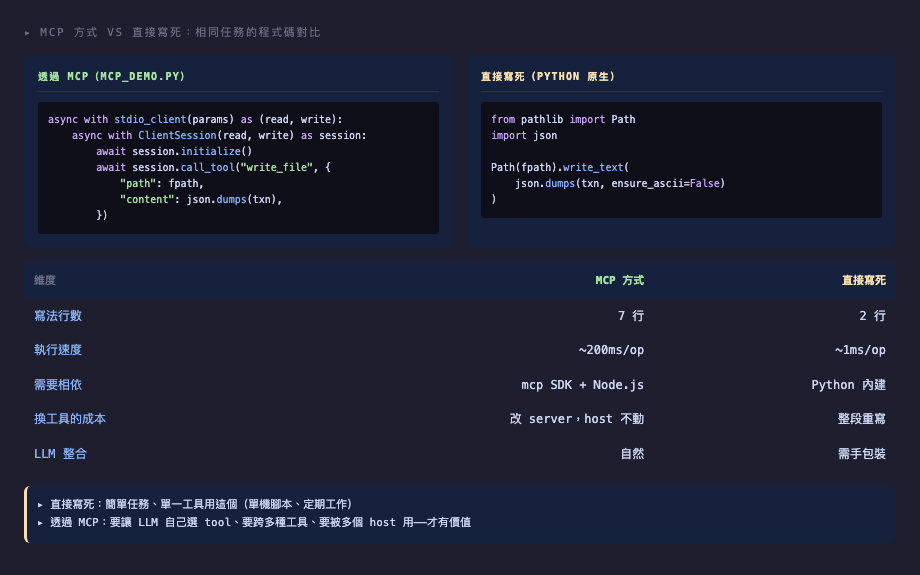
同樣的「寫一個 JSON 檔」,兩種寫法對比:
| 維度 | MCP 方式 | Python 直接 |
|---|---|---|
| 程式行數 | 7 行 | 2 行 |
| 執行速度 | ~200ms/次 | ~1ms/次 |
| 需要相依 | mcp SDK + Node.js | Python 內建 |
| 換工具的成本 | 改 server,host 不動 | 整段重寫 |
| LLM 整合 | 自然 | 需手包裝 |
對「我寫個 batch 處理 5 個 CSV」這種任務,直接寫 Python 完勝——簡單、快、無相依。
MCP 的價值要在更大的場景才浮現:
- 多 host 共用:寫一次 server,多個工具都能用
- 多 tool 組合:LLM 自己選 fs / db / api 組合動作
- 被 host 託管:Claude Desktop 等 host 統一管理 server 生命週期
MCP Way vs Direct Python
Same task "write one JSON file," two implementations:
| Dimension | MCP way | Python direct |
|---|---|---|
| Lines of code | 7 | 2 |
| Speed | ~200ms/op | ~1ms/op |
| Dependencies | mcp SDK + Node.js | Python stdlib |
| Switch tools | Change server, host unchanged | Rewrite all |
| LLM integration | Natural | Manual wrapping |
For "batch process 5 CSVs," direct Python wins — simple, fast, no dependencies.
MCP's value emerges in larger scenarios:
- Multiple hosts share: write the server once, multiple tools use it
- Multi-tool composition: LLM picks fs / db / api combinations
- Host-managed lifecycle: Claude Desktop and similar hosts manage server lifecycle
4 個踩雷紀錄
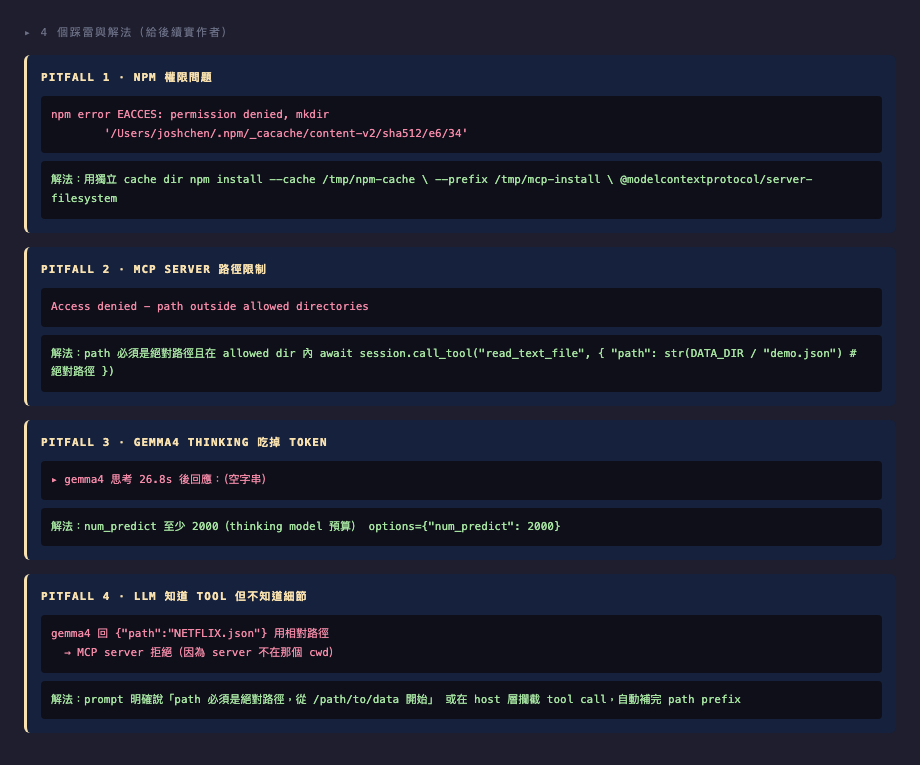
實作過程踩雷整理(給後續實作者):
- npm 權限問題:
~/.npm/_cacache權限損壞 → 解法npm install --cache /tmp/npm-cache --prefix /tmp/mcp-install <package> - MCP server 的 path 安全限制:filesystem server 只准存取啟動時
--args列出的 allowed dirs,path 必須絕對路徑 → 確認await session.call_tool("...", {"path": str(DATA_DIR / "file.json")}) - gemma4 是 thinking model:
num_predict太小(< 2000)會讓 thinking 把預算吃掉,response 空字串 → 設成 2000+ - LLM 給出 tool call 但 path 細節錯:LLM 知道用
write_file,但 path 給相對路徑導致 server 拒絕 → host 層需在 system prompt 明說 path 規則,或攔截 tool call 自動補完
4 Pitfalls
Pitfalls encountered (for future implementers):
- npm permission issue:
~/.npm/_cacachecorruption → Solution:npm install --cache /tmp/npm-cache --prefix /tmp/mcp-install <package> - MCP server path security: filesystem server only allows access to
--argsdirectories at startup, paths must be absolute → Useawait session.call_tool("...", {"path": str(DATA_DIR / "file.json")}) - gemma4 is a thinking model: small
num_predict(<2000) lets thinking consume the budget, leaving an empty response → Set to 2000+ - LLM gives tool call but path detail wrong: LLM knows to use
write_file, but gives a relative path → Host layer must specify path rules in system prompt, or intercept tool calls to auto-complete paths
決策框架:什麼時候用 MCP
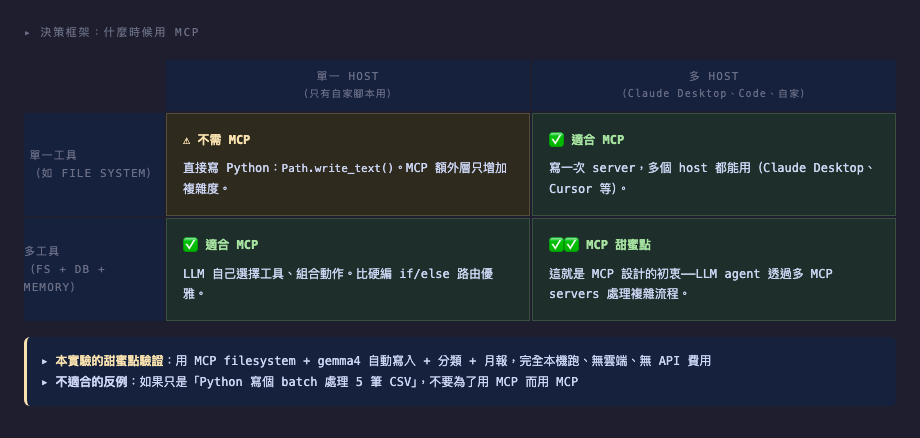
不需要 MCP:
- 單一 host(只有自家 Python 腳本)+ 單一工具 → 直接寫 Python 就好
有點需要:
- 多 host 共用 + 單一工具 → 寫 MCP server 一次,Claude Desktop / Cursor / 自家腳本都能用
- 單一 host + 多工具 → 用 MCP 讓 LLM 在工具間切換(比硬編 if/else 優雅)
MCP 甜蜜點:
- 多 host + 多工具 → 寫一組 MCP servers,多個 host 任意組合工具
本實驗示範了「單一 host(Python) + 單一工具(filesystem)」的 MCP,驗證概念但不一定划算——直接 Python 更快。但這是了解 MCP 怎麼運作的最小可行案例。
Decision Framework: When to Use MCP
Don't need MCP:
- Single host (just your own Python) + single tool → just write Python
Maybe need MCP:
- Multiple hosts + single tool → write the MCP server once, Claude Desktop / Cursor / your scripts all use it
- Single host + multiple tools → use MCP for LLM to switch between tools (more elegant than hardcoded if/else)
MCP sweet spot:
- Multiple hosts + multiple tools → write a set of MCP servers, hosts mix and match tools as needed
This experiment demonstrated "single host (Python) + single tool (filesystem)" — valid concept demo but not necessarily worthwhile in production, where direct Python is faster. But it's the minimum viable case to understand how MCP works.