過去一年,「AI 自己瀏覽網頁」這件事從研究專案變成生產工具:browser-use、Anthropic Computer Use、OpenAI Operator、Microsoft NLWeb⋯⋯每家都在推。但作為個人用戶,最關心的問題是:這東西能不能跑在本地?需要外送資料嗎?
這篇文章用 Playwright + 本地 Ollama gemma4,做兩個版本的「抓共振站 verdict 表格」實驗:v1 寫死 CSS selector,v2 讓 LLM 自己推理 selector。然後刻意改版 DOM,看哪個版本還活著。
This article uses Playwright + local Ollama gemma4 to build two versions of "extract verdicts from Resonance Stack": v1 hardcodes CSS selectors, v2 lets the LLM infer the selectors. Then I deliberately break the DOM and see which version still works.
為什麼不用 browser-use 框架?
browser-use 是現在最紅的開源框架,但對「我只想抓 6 個 card」這個 task 來說太重——要 LangChain、要設定 LLM provider、要管 action space。
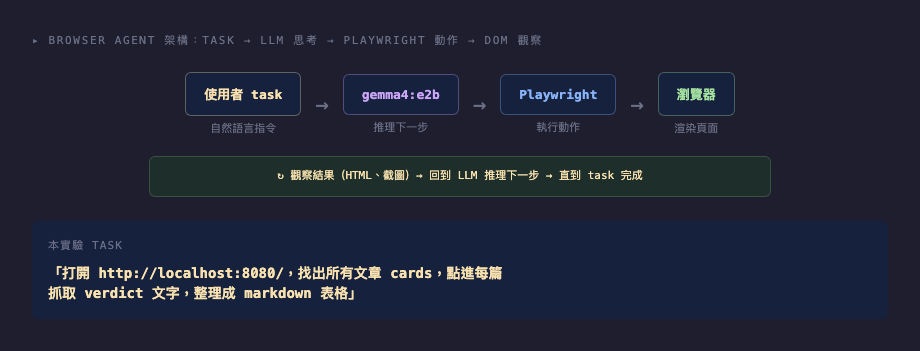
我用最小可行的方式:Playwright 直接抓 DOM + Ollama 在需要時推理。架構就 3 層:
- task:自然語言指令(「抓共振站所有 verdict」)
- LLM 思考:給 gemma4 看 HTML 片段,讓它推理 CSS selector
- Playwright 執行:用 LLM 給的 selector 抓資料
LLM 在這個架構不是「主導決策」,而是「翻譯員」——把不確定的 DOM 翻譯成 Playwright 能用的 selector。
Why Not Use the browser-use Framework?
browser-use is the most popular open-source framework right now, but it's overkill for a task as simple as "extract 6 cards" — it needs LangChain, LLM provider config, action space management.
I used the minimal approach: Playwright directly queries the DOM, Ollama steps in only when needed. Three layers:
- Task: natural language ("extract all verdicts from Resonance Stack")
- LLM reasoning: feed gemma4 an HTML snippet, ask it to infer CSS selectors
- Playwright execution: use the LLM's selectors to extract data
The LLM here isn't the decision-maker — it's a translator, converting an uncertain DOM into Playwright-compatible selectors.
兩個版本:寫死 vs LLM 推理
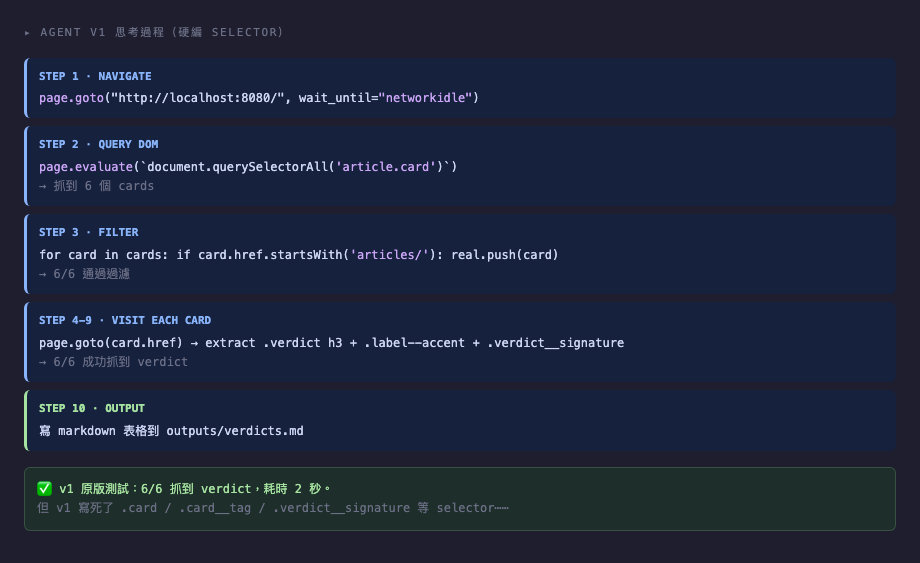
任務:抓首頁 6 個 article cards 的 verdict、tag、signature,整理成 markdown 表格。
v1(爬蟲式,~100 行):
cards = page.evaluate("""() => {
    return Array.from(document.querySelectorAll('article.card')).map(c => ({
        href: c.querySelector('a')?.getAttribute('href'),
        tag:  c.querySelector('.card__tag')?.textContent.trim(),
    }));
}""")
CSS selector .card、.card__tag 直接寫死。執行 0.01 秒。
v2(LLM-driven,~150 行):
把 HTML 片段給 gemma4:「請從以下 HTML 辨識文章卡片的 CSS selector,回傳 JSON。」LLM 推理後回傳 {"card_selector": ".card", "link_selector": ".card__title a", "tag_selector": ".card__tag"},再用 Playwright 抓。
LLM 推理約 15-30 秒,但每次跑都重新看 HTML,不依賴硬編值。
Two Versions: Hardcoded vs LLM-driven
Task: extract verdict, tag, and signature from 6 article cards into a markdown table.
v1 (scraper-style, ~100 lines):
cards = page.evaluate("""() => {
    return Array.from(document.querySelectorAll('article.card')).map(c => ({
        href: c.querySelector('a')?.getAttribute('href'),
        tag:  c.querySelector('.card__tag')?.textContent.trim(),
    }));
}""")
CSS selectors .card, .card__tag are hardcoded. Runs in 0.01 seconds.
v2 (LLM-driven, ~150 lines):
Feed the HTML snippet to gemma4: "Identify the CSS selectors for article cards. Return JSON." LLM returns {"card_selector": ".card", "link_selector": ".card__title a", "tag_selector": ".card__tag"}. Then Playwright uses those.
LLM reasoning takes 15–30 seconds, but every run looks at the current HTML — no hardcoded values.
v2 的 LLM 推理長什麼樣
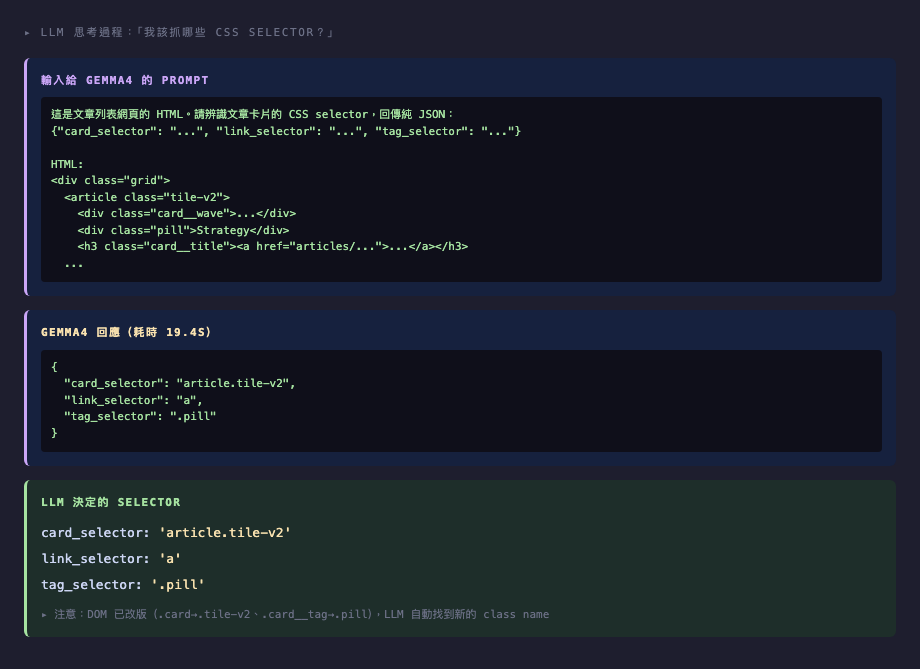
把首頁 .grid 區塊的 HTML(約 3500 字元)餵給 gemma4,附上指令:「請辨識文章卡片的 CSS selector,回傳純 JSON。」
gemma4 在 DOM 改版後的回應特別有趣:
{
  "card_selector": "article.tile-v2",
  "link_selector": ".card__title a",
  "tag_selector": ".pill"
}
注意:我改了 class(.card → .tile-v2、.card__tag → .pill),但 .card__title 沒改。gemma4 正確識別出哪些 class 變了、哪些沒變——這是 LLM 的「常識推理」能力。
What the v2 LLM Reasoning Looks Like
Feed the homepage .grid HTML (~3500 chars) to gemma4, with the instruction "Identify article card CSS selectors, return pure JSON."
After breaking the DOM, gemma4's response is particularly interesting:
{
  "card_selector": "article.tile-v2",
  "link_selector": ".card__title a",
  "tag_selector": ".pill"
}
Note: I renamed .card → .tile-v2 and .card__tag → .pill, but .card__title stayed. gemma4 correctly identifies which classes changed and which didn't — that's the LLM's common-sense reasoning at work.
抓取結果
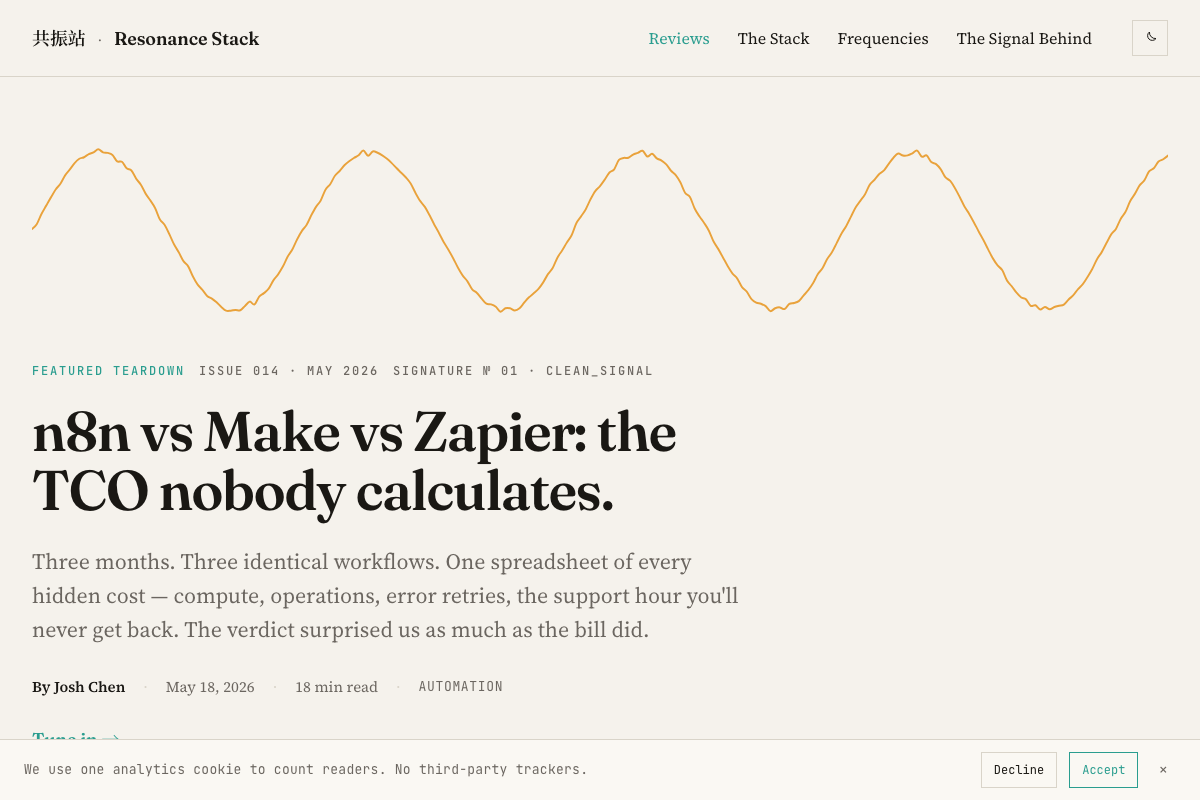
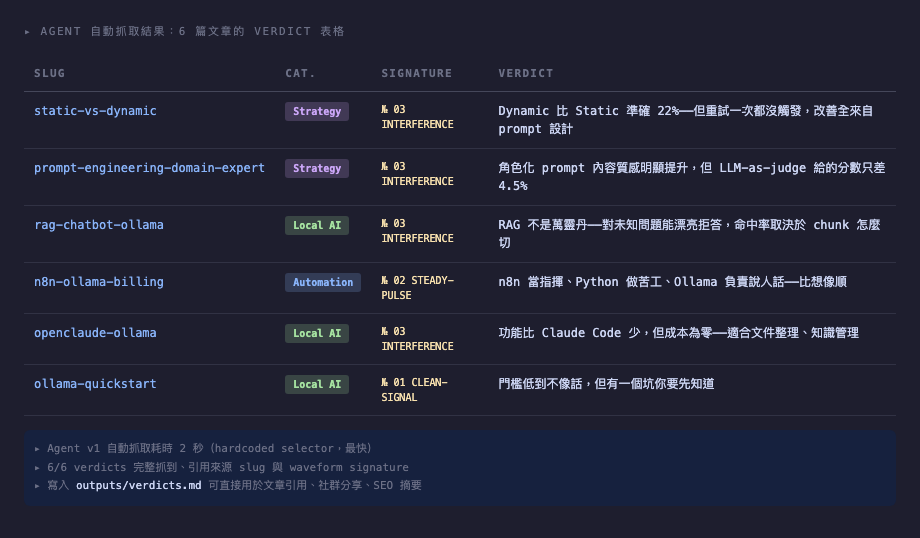
兩個版本在原始 DOM 上都抓到 6/6。輸出 markdown 表格直接可用:
| Slug | Category | Signature | Verdict |
|---|---|---|---|
| static-vs-dynamic | Strategy | № 03 INTERFERENCE | Dynamic 比 Static 準確 22%⋯⋯ |
| prompt-engineering-domain-expert | Strategy | № 03 INTERFERENCE | 角色化 prompt 內容質感⋯⋯ |
| rag-chatbot-ollama | Local AI | № 03 INTERFERENCE | RAG 不是萬靈丹⋯⋯ |
| ⋯⋯ |
寫入 outputs/verdicts.md,可直接用於文章內部引用、社群分享、SEO 摘要。
Extracted Results
Both versions extracted 6/6 on the original DOM. The markdown table is directly usable:
| Slug | Category | Signature | Verdict |
|---|---|---|---|
| static-vs-dynamic | Strategy | № 03 INTERFERENCE | Dynamic beat static by 22%... |
| prompt-engineering-domain-expert | Strategy | № 03 INTERFERENCE | Role prompts improve quality... |
| rag-chatbot-ollama | Local AI | № 03 INTERFERENCE | RAG isn't a silver bullet... |
| ... |
Written to outputs/verdicts.md — directly usable for internal article references, social sharing, SEO summaries.
DOM 改版測試:速度 vs 韌性
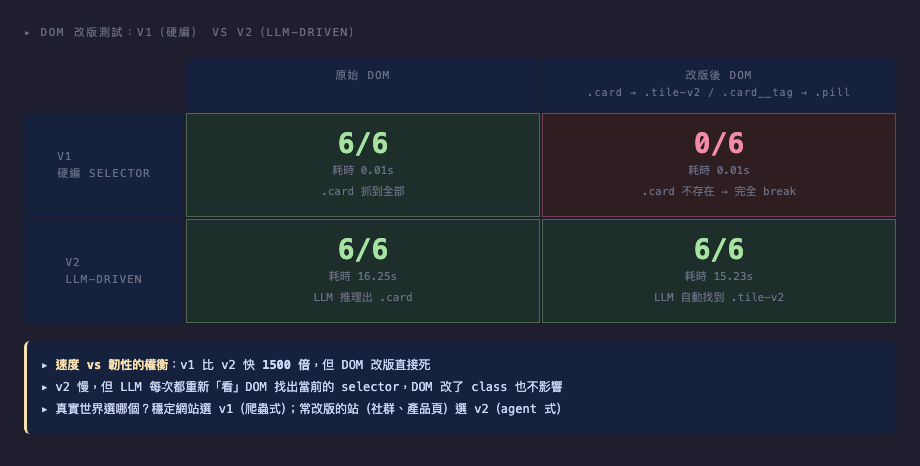
用 page.evaluate 注入 JS,把首頁的 .card 改成 .tile-v2、.card__tag 改成 .pill(模擬「網站重構」這種真實事件)。再跑兩個版本:
| 場景 | Hit | 耗時 |
|---|---|---|
| v1 原始 DOM | 6/6 | 0.01s |
| v1 改版後 DOM | 0/6 | 0.01s |
| v2 原始 DOM | 6/6 | 16.25s |
| v2 改版後 DOM | 6/6 | 15.23s |
結論清楚:v1 比 v2 快 1500 倍,但 DOM 改版直接死。v2 慢,但是「網站改版那天」還能跑。
這個對比解釋了為什麼 browser agent 一直紅:開發者面對的真實痛點不是「我抓不到」,而是「我抓得到,但網站改版後又要重寫」。v2 把「適應改版」的成本從「每次都要工程師介入」變成「每次跑都自動處理」。
DOM Change Test: Speed vs Resilience
Using page.evaluate to inject JS, I renamed .card → .tile-v2 and .card__tag → .pill (simulating a real "site refactor" event). Then reran both versions:
| Scenario | Hit | Time |
|---|---|---|
| v1 original DOM | 6/6 | 0.01s |
| v1 broken DOM | 0/6 | 0.01s |
| v2 original DOM | 6/6 | 16.25s |
| v2 broken DOM | 6/6 | 15.23s |
The takeaway is clear: v1 is 1500× faster than v2, but dies on DOM changes. v2 is slow but still works the day the site refactors.
This comparison explains why browser agents have been hot: the real pain isn't "I can't extract data" — it's "I can extract data, but every site refactor breaks my code." v2 shifts the cost of "adapting to changes" from "engineer intervenes every time" to "auto-handled every run."
本機模型對照:e2b vs 12b
文章前面用 gemma4:e2b(2B 級)跑出 v2 的結果。Gemma 4 12B 出來後我把同樣的 task 重跑一輪——對照的不是「local vs cloud」,是「local 內的 size 取捨」。重跑日 2026-06-08,首頁卡片數已從原本的 6 張長到 14 張,但任務型態完全一樣:餵 grid HTML 片段、讓 LLM 推理 CSS selector、Playwright 執行。
| 模型 | 原始 DOM 推理時間 | 命中 | 改版 DOM 推理時間 | 命中 | 模型檔案大小 |
|---|---|---|---|---|---|
gemma4:e2b | 28.9 s | 6/6 | 19.4 s | 6/6 | 7.2 GB |
gemma4:12b | 67.1 s | 14/14 | 61.8 s | 14/14 | 7.6 GB |
兩個觀察值得拆開講。
1. 12B 在速度上付出代價、品質沒拿到對應回報
12B 在這個 task 比 e2b 慢 2.3-3.2 倍。但兩個模型在「能不能跑」這層完全打平——兩邊都是 100% 命中。對於「browser agent 該選哪個本機模型」這題,這個結果其實是清楚的:不必為了瀏覽器 agent 換 12B。e2b 已經夠用。
2. 12B 的 selector 更挑剔
把 LLM 給的 selector 攤開來看:
| 場景 | e2b 給的 link selector | 12b 給的 link selector |
|---|---|---|
| 原始 DOM | 'a' | '.card__title a' |
| 改版 DOM | 'a' | 'h3.headline a' |
e2b 用最寬的 a selector——能用、但每個 card 裡可能不只一個 <a> 的網站會炸。12B 自動加了 h3.headline 或 .card__title 的祖先層級——這在多連結 card 的情境會穩很多。
這是個有意思的「同樣命中率、不同品質」案例:兩邊 14/14,但 12B 給的程式碼更耐操。如果你的 task 是 throwaway 試一次(像這個實驗),e2b 完全夠;如果是要丟進長期 pipeline、要對未來看不到的網站結構容錯,12B 的多花 ~40 秒可能值得。
結論:在這個任務上 e2b 與 12B 都過。選擇本機 LLM 不應該以「browser agent 需要」為主要考量——這個任務是 LLM 用得最輕的場景之一。模型大小取捨應該看你主要工作流的其他任務(程式碼生成、reasoning、長 context)。
完整對照腳本與輸出:tests/scripts/browser_agent_v2_compare.py、tests/outputs/agent_v2_gemma4_12b_original.json、tests/outputs/agent_v2_gemma4_12b_broken.json。
Local Model Comparison: e2b vs 12b
The original v2 experiment used gemma4:e2b (2B-class). When Gemma 4 12B landed I reran the same task — the comparison isn't "local vs cloud," it's "size trade-off within local." Reran on 2026-06-08; the homepage has since grown from 6 cards to 14, but the task shape is identical: feed the grid HTML snippet to the LLM, infer CSS selectors, let Playwright execute.
| Model | Original DOM inference | Hits | Broken DOM inference | Hits | File size |
|---|---|---|---|---|---|
gemma4:e2b | 28.9 s | 6/6 | 19.4 s | 6/6 | 7.2 GB |
gemma4:12b | 67.1 s | 14/14 | 61.8 s | 14/14 | 7.6 GB |
Two observations worth unpacking.
1. 12B pays a speed cost without a quality payoff
12B is 2.3-3.2× slower than e2b on this task. But both models tie at 100% extraction on both DOM states. For "which local model for a browser agent," the answer is clean: you don't need to upgrade to 12B for this. e2b suffices.
2. 12B picks more discriminating selectors
The link selector each model chose:
| Scenario | e2b's link selector | 12b's link selector |
|---|---|---|
| Original DOM | 'a' | '.card__title a' |
| Broken DOM | 'a' | 'h3.headline a' |
e2b used the broadest possible a — works, but would break on any site where cards contain multiple anchors. 12B reflexively added the ancestor qualifier (h3.headline or .card__title), which is robust against multi-link cards.
A genuinely interesting "same hit rate, different quality" case: 14/14 on both, but 12B's code is more durable. For a throwaway experiment (this one), e2b is plenty. For a long-running pipeline that needs to absorb unseen site structures, 12B's extra ~40s may earn its keep.
Takeaway: both work on this task. Don't choose a local LLM based on "browser agent needs" — this is one of the lightest tasks an LLM does. Size choice should be driven by other parts of your workflow (code generation, reasoning, long context).
Full comparison script and outputs: tests/scripts/browser_agent_v2_compare.py, tests/outputs/agent_v2_gemma4_12b_original.json, tests/outputs/agent_v2_gemma4_12b_broken.json.
決策框架:什麼時候該用 Browser Agent
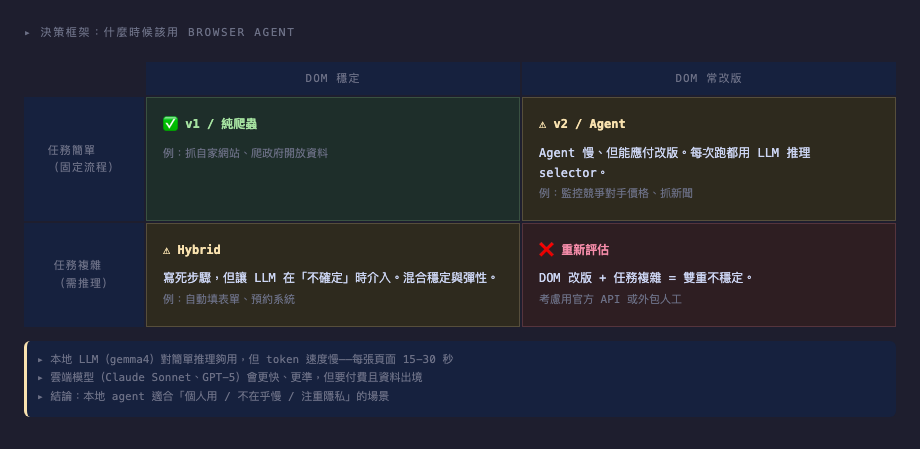
選 v1(爬蟲式)當:
- DOM 你控制(自家網站、內網工具)
- 跑很頻繁(每天、每小時)—— LLM 成本累積快
- 任務固定(不會變需求)
選 v2(LLM-driven)當:
- 第三方網站,DOM 不在你掌握
- 跑頻率低(每週、每月)—— 慢一點可以接受
- 預期 selector 會變
Hybrid 模式(兩者都用):
- 先試 v1,失敗時 fallback 到 v2
- 真實 production 系統的合理做法
不適合的情境:
- 需要登入 / 處理 cookie banner / 多分頁 state —— 這些是 agent framework(browser-use)才解決得了的層次
- 多模態理解(看圖填表)—— 本地 gemma4 視覺能力不夠
Decision Framework: When to Use a Browser Agent
Choose v1 (scraper-style) when:
- You control the DOM (own site, internal tool)
- High frequency (daily, hourly) — LLM costs add up fast
- Fixed task (no shifting requirements)
Choose v2 (LLM-driven) when:
- Third-party site you don't control
- Low frequency (weekly, monthly) — slowness is acceptable
- Selectors are expected to change
Hybrid mode (use both):
- Try v1 first, fall back to v2 on failure
- Reasonable for real production systems
Not suitable when:
- Login required / cookie banners / multi-tab state — that's where you need a full agent framework like browser-use
- Multimodal understanding (read image to fill form) — local gemma4's vision isn't there yet